
How to Turn One YouTube Video Into 5 Content Formats With AI
Contents
You do not need five new ideas to publish in five formats. If you already made a useful YouTube video, the video can become the source material for a blog post, newsletter, short-video briefs, social posts, and an FAQ. The important part is to treat the transcript as evidence, not as a prompt for the AI to improvise.
What is AI content repurposing?
AI content repurposing is the process of taking one finished source asset and adapting its ideas for other formats. In this workflow, your own YouTube video is the source of truth. AI helps clean, organize, compress, and reshape the material; it does not get permission to invent new claims just because a new format needs more copy.
The difference matters. A transcript is evidence of what you actually said. A generic “write five posts about this topic” prompt is an invitation to fill gaps. The safest workflow keeps the source visible at every step.
Key takeaways
- Start with your own caption or transcript file, not a vague summary of the video.
- Clean the transcript before asking for polished copy.
- Build an idea map once, then draft each output from that map instead of generating everything in one prompt.
- Use AI for transformation and structure; verify factual claims against the transcript and current primary sources.
- Measure your own time saved. There is no honest universal “AI saves X hours” number.
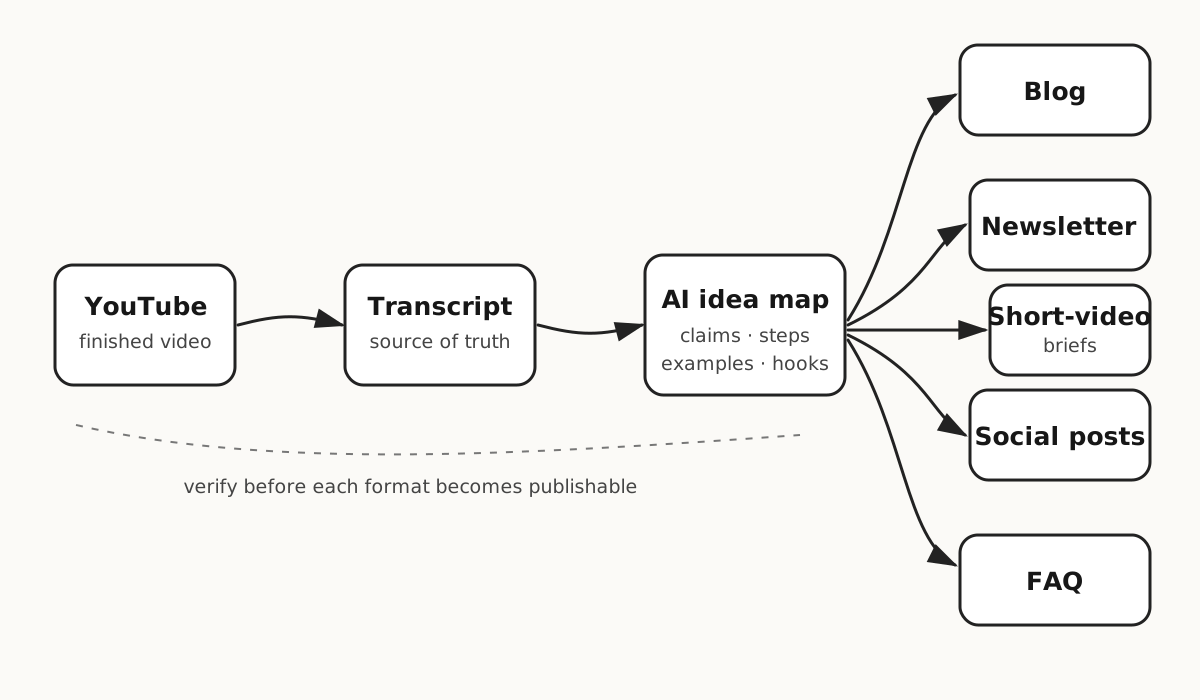
Step 1: Export the captions from your YouTube video
If the video is yours, YouTube Studio already gives you a practical starting point. YouTube's current help documentation says you can open YouTube Studio → Subtitles → choose the video → Edit → Options → Download subtitles. That produces a caption file you can edit locally.
Official source: YouTube Help — Edit or remove captions.
This is better than starting with memory because the transcript preserves the actual claims, examples, names, and sequence of the finished video. It also makes later fact-checking much easier.
What if the captions are messy?
That is normal. Automatic captions can have punctuation errors, speaker mistakes, or incorrect names. OpenAI also warns that transcription may contain errors and speaker identification can be unreliable, so important details still need to be checked against the recording.
For this workflow, do not ask AI to “improve” the content yet. First ask it to clean only what is clearly mechanical.
You are cleaning a transcript from my own published video.

Rules:
- Preserve the meaning and every factual claim.
- Fix punctuation, obvious caption breaks, and repeated filler only.
- Do not add facts, examples, statistics, or advice.
- If a name, number, or phrase is uncertain, mark it [CHECK].
- Keep useful section boundaries.

Return:
1. Clean transcript
2. A short list of every [CHECK] item
ChatGPT can work with uploaded document and text files. OpenAI's current documentation lists file uploads as available on Free and paid plans subject to plan and workspace limits; audio upload has separate paid-plan availability. For this process, the caption file is enough, so you do not need to upload the full video just to begin repurposing it.
Official sources: OpenAI Help Center — Uploading files and audio to ChatGPT and OpenAI Academy — Working with files.
Step 2: Turn the clean transcript into an idea map
The idea map is the most useful intermediate file in this workflow. It separates what the source contains from how each platform should present it.
Ask for atomic pieces: claims, steps, examples, objections, quotable lines, questions, and visual moments. Every item should be traceable to the transcript.
Use only the transcript in this chat.

Create an idea map with these columns:
- Idea / claim
- Why a creator would care
- Evidence or example from the transcript
- Best format: blog / newsletter / short video / social / FAQ
- Needs external fact-check? yes/no

Do not invent missing evidence.
If an idea depends on a current product feature, price, policy, statistic, or platform rule, mark it FACT-CHECK.
Do not skip the last column. A video can remain useful for years while one product price, model name, interface step, or platform policy becomes obsolete. The transcript proves what you said; it does not prove that the claim is still current today.
Step 3: Create five outputs from the approved idea map
Do not use one giant prompt such as “turn this into a blog, newsletter, posts, Shorts, and FAQ.” Each format makes different editorial decisions. Generate them separately from the same approved idea map.
Format 1: SEO/GEO blog post
The blog post should answer the searcher's problem directly, then expand with the useful steps and evidence from the video. Spoken repetition should disappear. Visual context that was obvious on video needs to become text, screenshots, diagrams, or explicit instructions.
Write a practical article from the approved idea map.

Reader: a working content creator who wants to act today.
Structure:
- answer-first opening
- short definition
- step-by-step workflow
- concrete example
- costs / effort, only where supported
- limits and risks
- FAQ based on real follow-up questions

Use original wording.
Do not copy transcript sentences unless I explicitly mark them as quotes.
Do not add statistics or product claims that are not verified.
Format 2: Newsletter
A newsletter usually works better when it carries one useful idea rather than becoming a compressed version of the whole video. Pick the strongest problem/lesson, explain it, then link back to the original video or article for the full process.
Turn the idea map into one newsletter issue.
Choose ONE useful lesson, not a summary of the whole video.
Use:
- a concrete opening problem
- one explanation
- one example from the source
- one action the reader can try today
- one link placeholder back to the full video/article
Keep every factual claim traceable to the approved idea map.
Format 3: Short-video briefs
AI should identify candidate moments, not pretend it watched frames it never received. If you only supplied a transcript, ask for ideas and source text to locate—not exact visual judgments.
From the transcript and idea map, propose 3 short-video briefs.
For each brief give:
- hook
- exact source idea or passage to locate in the edit
- 3-beat structure
- on-screen text suggestion
- final payoff

Do not claim a visual moment exists unless the transcript explicitly describes it.
Do not invent timestamps if the source file does not contain them.
Format 4: Social posts
The goal is not to paste the same caption everywhere. Extract independent ideas that still make sense when the audience has not watched the video.
Create 5 standalone social posts from five different ideas in the map.
Each post must:
- make sense without seeing the original video
- teach one thing
- avoid vague motivational language
- avoid invented results
- keep product/version claims out unless verified today
Return the source idea used for each post so I can audit it.
Format 5: FAQ / answer-engine block
An FAQ is useful when it answers real follow-up questions. It is not useful when it repeats headings just to create more schema markup.
Create 5 follow-up questions a creator would reasonably ask after reading the workflow.
Answer each in 2-4 sentences using only the verified source material.
If the source does not answer a question, write NEEDS RESEARCH instead of guessing.
Step 4: Fact-check the outputs before publishing
The final drafts can contain two kinds of information: facts inherited from your source video and facts added during the update/research process. Both can be wrong for different reasons.
- Transcript facts: verify names, numbers, quotes, and important technical claims against the original recording.
- Current product facts: verify pricing, feature availability, model/version names, policies, and workflow steps against current official documentation.
- Performance claims: remove them unless you have real analytics or a cited case.
- Examples: label hypothetical examples clearly instead of writing them as personal experience.
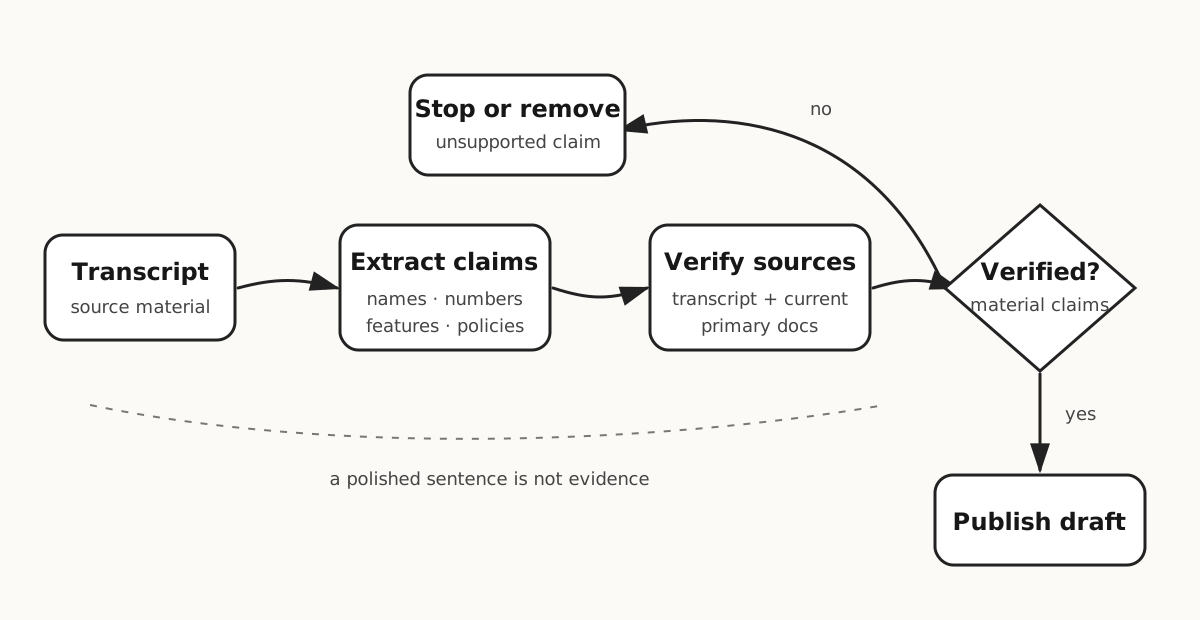
Audit this draft before publication.

For every factual sentence, classify it as:
A. directly supported by my transcript
B. supported by a cited current source
C. opinion / recommendation
D. unsupported

Return all D items first.
For every volatile product feature, price, version, policy, or platform rule, require a current primary source.
Do not rewrite unsupported claims to sound more confident. Remove or qualify them.
A realistic example: repurposing a 12-minute creator tutorial
This is an illustrative example, not a claimed case study. Imagine you published a 12-minute tutorial showing how you clean podcast audio before uploading clips.
After exporting and cleaning the captions, the idea map might contain: why noise cleanup matters, your three-step process, the settings you demonstrate, one common mistake, and one before/after listening test.
From that source, the five-format output could be:
- Blog: a searchable step-by-step version with screenshots and current tool documentation.
- Newsletter: one lesson about fixing audio before editing short clips.
- Short-video briefs: three candidate clips built around the mistake, the before/after test, and the final settings.
- Social posts: five standalone audio-cleanup tips, each linked back to one source idea.
- FAQ: questions about source audio, over-processing, background noise, and when the workflow is not enough.
The “result” is a reusable publishing package derived from one verified source—not a made-up promise that the workflow will increase views or revenue.
What does this cost, and how much time does it save?
There is no responsible universal answer.
YouTube Studio provides the caption-download workflow for your videos. ChatGPT supports document/text uploads on Free and paid plans subject to limits and settings; audio upload has separate paid-plan availability. If you already have a usable caption file, this workflow does not require a separate audio transcription step.
For time saved, measure your own baseline instead of copying a marketing number:
- Time one normal cycle where you create the five formats manually.
- Time three transcript-first AI cycles.
- Use the median AI-assisted cycle rather than the fastest one.
- Include verification and editing time. Do not count a rough draft as “finished.”
Your useful metric is finished, publishable outputs per hour, not words generated per minute.
Where this workflow breaks
The transcript cannot see the video
If the value is in a screen recording, chart, facial expression, B-roll shot, or visual demonstration, the transcript alone is incomplete. Add screenshots or notes before asking AI to explain that part.
Captions can be wrong
Names, jargon, accents, and numbers can be transcribed incorrectly. Check important details against the recording. OpenAI's own upload documentation similarly warns that transcription accuracy and speaker identification can vary.
Different platforms need different context
A good blog paragraph may be a bad short-video hook. A useful newsletter may not need the article's full keyword framing. Repurposing means preserving the idea while adapting the format—not copying the same text five times.
Old videos can contain old facts
If a video mentions a price, software version, AI model, platform limit, or policy, research it again before publishing new written material in 2026. Repurposing should not give stale information a new publication date.
Do not repurpose content you do not have rights to use
This workflow is for your own material or material you have permission to reuse. A transcript is not a shortcut around another creator's copyright.
How to start today
- Pick one useful video you already published.
- Download its captions from YouTube Studio.
- Clean the transcript with the first prompt above.
- Create the idea map and manually approve it.
- Generate only one output first—usually the blog or newsletter.
- Fact-check it against the transcript and current official sources.
- Once the process works, generate the remaining formats from the same approved map.
Do not automate the publishing step first. Automate the boring transformations after you know what a good output looks like.
FAQ
Do I need to upload the full YouTube video to ChatGPT?
No. For this workflow, a caption or transcript file is enough and is easier to inspect as a source of truth. If key information is visual, add the relevant screenshots or notes separately.
Can I publish the AI drafts without checking them?
No. Check claims, examples, names, links, and platform-specific details against the transcript and current primary sources. Repurposing makes drafting faster; it does not make verification optional.
How much time does this workflow save?
There is no universal number. Measure your own baseline and compare it with at least three AI-assisted repurposing cycles, including editing and verification time.